Saturday, March 23, 2013

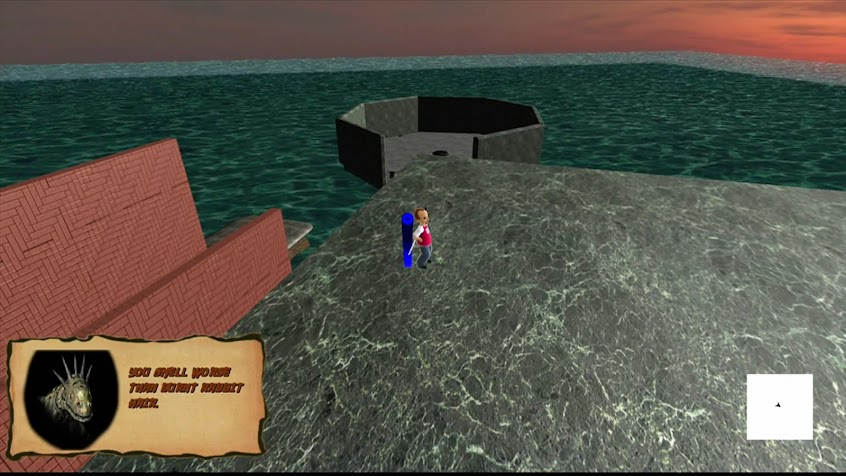
Avatar Trials Level Pictures:

Avatar Trials Level Pictures:

Photo

Photo

Photo

Photo


Challenges with Avatar Trials

     Avatar Trials has been a great experience. We are able to make a game at the top school in the nation for making games and instantly export our title to Xbox 360 for testing. We have a great team of 12 and two semesters to do it. However, there are great challenges in video game production.

    Unless you are a giant prodigy, making games is difficult from early concept to pre-production to marketing. As the art director for Avatar Trials: Ninja Uprising, I had some tough challenges to help get this game to the Xbox Live. Project management is one of the tougher parts of this project. When I work alone it is easy for me to get in a groove and create cool stuff, but in the groove I make things only a certain way. It is tough for me to hear criticism from eleven other people and make the change. The other way around I have to make decisions and tell people things need to be changed. Artists can get a bit emotional, but that makes artists great. I tried to change my style and help others too.
     Another problem is iteration. Iterations are huge in video game design. Avatar Trials went through revision after revision until we decided how we could make our game fun in the amount of time we had. I could not be attached to an idea that I liked if it was not fun. Video games should be at least entertaining. Iteration is key.
     I also had issues with staying to a rigid schedule. When school, life, and work gets in the way of my video game it was important to keep everyone on task. This is harder than it sounds. Everyone is busy and no one has time. Make Time!
    Finally, when managing a team communication is key. Making sure that everyone is on task and communicating with each other is vital. After 3 game projects I still have a hard time communicating and keeping everyone on the team talking to together.
    To wrap up: Be ready to throw out everything and start over. Work in a team. Iterate over your game. Create a schedule you can stick to, but don't burn out. Communicate! 

Friday, March 22, 2013

U of U #1

Did I mention that the video game design degree I am getting at the U is now rated numero uno? That seriously means #1. In the year that I will graduate I can say that the program I went through got rated #1! That is really awesome. I would like to thank Roger Altizer and Bob Kessler and EAE staff for making this possible. When I started at the U this program was only a few years old. It is amazing how far and fast this happened. It has been a wonderful ride making games. Thank you Thank you!

Saturday, March 16, 2013

Avatar Trials: Ninja Uprising Progress

We are really starting to nail things down and it has been a fun path. The level design and game design has dramatically changed ideas. It has been a rollercoaster. The level design once started out as one big island, then a bunch of small islands. Then, it became a coastal area with a mountain. Finally, we have reached this idea of sky islands and floating platforms. They are floating over water(with sharks!no...) and you will die if you fall into it. You are an incredible ninja that can't swim. Level 1 starts you out with all of your abilities. You will find scrolls that remind you want you can do while the level forces you to use certain abilities. This way we are directing the player down the path of learning the ninja's moves. We give the player "nets" that catch you if you fall, but you have to walk back up and try again. At the end of the level the player should know all of their moves. In Level 2 it is similar to the first, but without nets. The level is also more difficult. Level 3 is very hard and without nets. The player is told that they have no chance to defeat this level.

Normal Mapping

Dear world,

I really like normal mapping. It's like cheating. You create a low-poly model that looks high poly for cheap. I mean initially you may have to create a high-poly mesh first, but that is fun too! Some of the cool tools I use for this are photoshop, xnormal, crazybump, and the nvidia normal map filter. Xnormal is free and the nvidia filter are free. I highly recommend them both. Photoshop is obviously not free, but you could use gimp for the of the post effects. Crazybump has a free beta for mac users and a short demo for windows users. It is quite the program and you can purchase it for under $100 bucks for personal use. This takes a photograph and converts it to a normal map, specular map, AO, and displacement map with settings! However, I am finding that I like to use the xnormal and nvidia filters in Photoshop. That way I can fine tune my map the way I would like it to be. Overall normal mapping is cool and everyone should look into it. Thank you.

-Max

Tuesday, February 12, 2013

Avatar Ninja Publicity!

Avatar Ninja got some publicity by some master's students at the University of Utah! They created a podcast about the undergraduate games. Here is a link to listen to a great podcast:

http://www.spencerbuchanan.com/confessions-of-a-gamedev-podcast-episode-17-u-of-u-game-review

Here they talk about Attraction, Avatar Ninja, and Heroes of Rock.

Tuesday, January 29, 2013

Transparency Shader


Transparency Shader

Thank you to RB Whitaker his fabulous blog I wrote a transparency shader for XNA:

I am going to use this in a game I am working for XBLIG called Ninja Avatar: The Trials. We want to give the player the ability to look through buildings and find something. I will use this shader two-fold. I will give the unwanted buildings a regular transparency, then I will give the object that the player wants a pinkish glow.  I am very excited!


float4x4 World;
float4x4 View;
float4x4 Projection;
float4x4 WorldInverseTranspose;

float4 AmbientColor = float4(1, 1, 1, 1);
float AmbientIntensity = 0.5;

float3 DiffuseLightDirection = float3(1, 0, 0);
float4 DiffuseColor = float4(6, 1, 1, 1);
float DiffuseIntensity = 1.0;

float Shininess = 100;
float4 SpecularColor = float4(1, 1, 1, 1);
float SpecularIntensity = .1;
float3 ViewVector = float3(1, 0, 0);

float Transparency = 0.5;

texture ModelTexture;
sampler2D textureSampler = sampler_state {
    Texture = (ModelTexture);
    MinFilter = Linear;
    MagFilter = Linear;
    AddressU = Wrap;
    AddressV = Wrap;
};

struct VertexShaderInput
{
    float4 Position : POSITION0;
    float4 Normal : NORMAL0;
    float2 TextureCoordinate : TEXCOORD0;
};

struct VertexShaderOutput
{
    float4 Position : POSITION0;
    float4 Color : COLOR0;
    float3 Normal : TEXCOORD0;
    float2 TextureCoordinate : TEXCOORD1;
};

VertexShaderOutput VertexShaderFunction(VertexShaderInput input)
{
    VertexShaderOutput output;

    float4 worldPosition = mul(input.Position, World);
    float4 viewPosition = mul(worldPosition, View);
    output.Position = mul(viewPosition, Projection);

    float4 normal = normalize(mul(input.Normal, WorldInverseTranspose));
    float lightIntensity = dot(normal, DiffuseLightDirection);
    output.Color = saturate(DiffuseColor * DiffuseIntensity * lightIntensity);

    output.Normal = normal;

    output.TextureCoordinate = input.TextureCoordinate;
    return output;
}

float4 PixelShaderFunction(VertexShaderOutput input) : COLOR0
{
    float3 light = normalize(DiffuseLightDirection);
    float3 normal = normalize(input.Normal);
    float3 r = normalize(2 * dot(light, normal) * normal - light);
    float3 v = normalize(mul(normalize(ViewVector), World));
    float dotProduct = dot(r, v);

    float4 specular = SpecularIntensity * SpecularColor * max(pow(dotProduct, Shininess), 0) * length(input.Color);

    float4 textureColor = tex2D(textureSampler, input.TextureCoordinate);
    textureColor.a = 1;

    float4 color = saturate(textureColor * (input.Color) + AmbientColor * AmbientIntensity + specular);
    color.a = Transparency;
    return color;
}

technique Textured
{
    pass Pass1
    {
        AlphaBlendEnable = TRUE;
        DestBlend = INVSRCALPHA;
        SrcBlend = SRCALPHA;
        VertexShader = compile vs_2_0 VertexShaderFunction();
        PixelShader = compile ps_2_0 PixelShaderFunction();
    }
}